


HamGeek TEF6686 Portable Full Band Receiver WiFi/Bluetooth FM/SW/MW/LW Radio with 2.8-inch IPS Touch Screen
受取状況を読み込めませんでした

Basic Parameters:
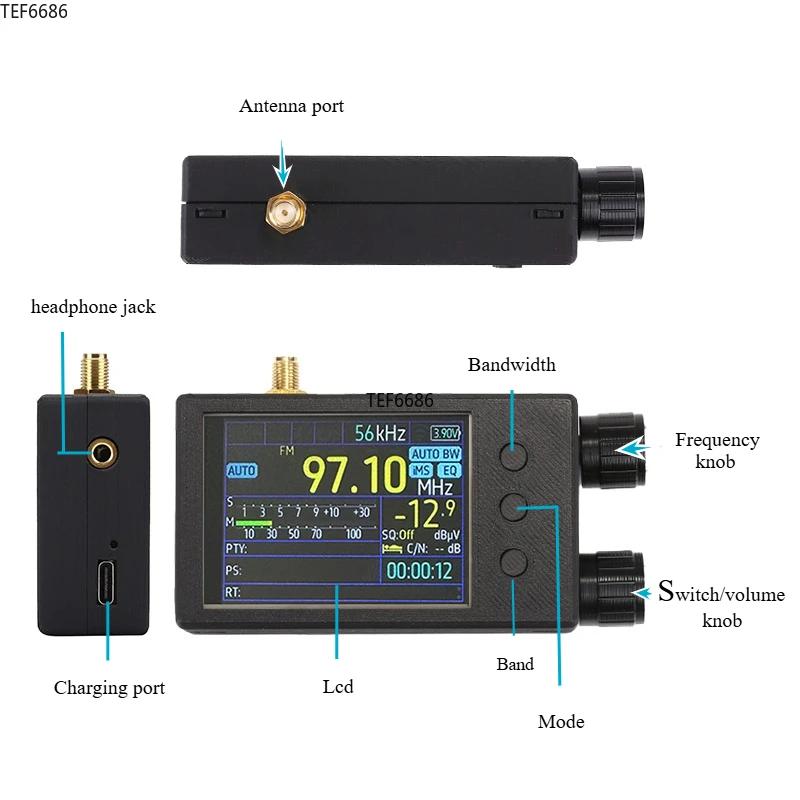
- Main control chip: ESP32-WROOM-32U, Flash 4MB, WiFi + Bluetooth dual core module
- Display technology: 2.8-inch 320x240 resolution, IPS full view LCD screen with resistive touch
- Control mode: default numeric keypad input and knob tuning, also supports third-party touch screen firmware
- Antenna interface: external antenna is used for all frequency bands, with standard SMA female connector
- Speaker output: using for TI audio amplifier chip TPA6211A1, it drives a 45x45mm large-sized sound cavity speaker with a power of 4ohm/3W, resulting in lower output noise and distortion.
- Earphone output: using for AD headphone amplifier chip MAX97220, standard 3.5mm audio connector output, speaker and headphone independent dual amplifier design, optimized for mutual benefit.
- Battery parameters: 3.7V/5000mAh, 18.5Wh, lithium battery size of 65x55x10mm
- Current consumption: about 3.7V/350mA, usage time is about 15 hours
- Communication interface: built-in CH340 USB to serial chip, communicates externally through TYPE-C interface
- Size and weight: 142 x 30 x 80mm (excluding antenna connectors and antennas length), body weight of 300g
Frequency Range:
- FM:
65 - 108MHz: suitable for Russia/Eastern Europe
76 - 95MHz: suitable for Japan
76 - 108MHz: suitable for campus broadcasting
87 - 108MHz: suitable for Europe/Oceania/Africa/Asia
87.5 - 108MHz: suitable for China/USA
OIRT default step is 30kHz, FM step is 50/100/200kHz, default is 100kHz
- SW: 1700 - 27000kHz, default step is 5kHz
- MW: 522 - 1791kHz, default step is 9kHz; 520 - 1720kHz, default step is 10kHz
- LW: 144 - 513kHz, default step is 9kHz
Receiving (Receiving sensitivity/selectivity):
- FM: FM (S/N=30dB)≤0.5uV; FM≥60dB (+150kHz)
- SW: SW (S/N=20dB)≤10uV; SW≥60dB (BW=3kHz/±5kHz)
- MW: MW (S/N=20dB)≤10uV; MW≥60dB (BW=3kHz/±9kHz)
- LW: LW (S/N=20dB)≤10uV; LW≥60dB (BW=3kHz/±9kHz)
Basic Operation:
- Main Switch: The machine's main switch, OFF position is to disconnect the battery, ON position is to connect the battery. Please turn off this switch when the machine is not in use for a long time to prevent accidental power on.
- POWER button: Power button, short press to switch between power on and off states.
- TUNING knob: Rotate to adjust frequency, short press to step switch, long press to turn on iMS and EQ.
- VOLUME knob: volume adjustment
- SQL gear: static noise level adjustment
- BW button: bandwidth selection
Short press in FM mode: stereo/mono switch
Long press in FM mode to switch demodulation bandwidth between 56/64/72/84/97/114/133/151/168/184/200/217/236/254/287/311kHz/AUTO BW, or press and hold the BW button and use the TUNING knob to select.
Short press in AM mode: Switch demodulation bandwidth between 3/4/6/8kHz.
- MODE button: Adjustment mode
Short press: MAN (manual frequency modulation)/AUTO (automatic search)/MEM (storage operation) mode switch
Long press: Open menu page
- BAND button: Band selection
Short press: Band switching, switching between LW/MW/SW/OIRT/FM
Long press in FM mode: Open advanced RDS view/Alternative Frequency view
Press and hold for more than 5 seconds: Sleep or turn off screen
- Storage radio process:
(1) Tune to the radio station you want to store in the preset.
(2) Switch the MODE button until you see "MEM" highlighted.
(3) Press the TUNING button, and "MEM" will turn red.
(4) Select the desired storage channel. You will see colors on the preset number: red indicates that the frequency has been stored on this preset, and green indicates that there is no frequency stored on this preset.
(5) Press the TUNING button again to store the preset.
Advanced Operation:
- Change encoder direction: Press and hold the BW button when turning on the device.
- Rotating screen: Press and hold the MODE button when turning on the device.
- Restore default settings: Press and hold the BW and TUNING knobs when booting up.
Package Included:
- 1 x HamGeek Main Unit
- 1 x USB Cable
- 1 x Telescopic Antenna
We accept the following forms of payment:
Credit Card (Visa, MasterCard, American Express, JCB)
PayPal
Bank Transfer (Please contact us Hamgeek@163.com for details)
Delivery and Shipping Fee
Shipping Services & Shipping Fee
Orders will be shipped by 4PX(10-20days Delivery time),if you need ship by Express shipping etc. DHL,FeDex,UPS,Please pay extra fee . Due to air transportation restrictions, package only contains battery is not accept by shipping company.
If your order does not qualify for free shipping,our service department will contact you for shipping fee details within 2 days after order placed.
Shipping Notice
For special shipping requests, please contact service department by email (HamGeek@163.com) or whatsapp. Please confirm your address before payment. If you enter the wrong address, please contact us in a timely manner. We will contact logistics personnel to solve the problem. If you ask to change the address after the order has been shipped, we cannot guarantee that your order will be updated. In addition, you are responsible for all possible risks and expenses caused by changing the address after the order has been shipped.
When you place an order, be sure to enter the correct name, address, and contact information so that we can deliver your items successfully.If you need order to be shipped by Express or the package weight is over 2kg that only can be sent by Express shipping,Please offer VAT number before order processed.
Delivery Time
Total delivery time is composed of two parts: processing time and actual shipping time.
Processing time refers to the time from when your payment is received to when we collect and pack your order. Our processing takes 1-2 working days normally. The second part is the actual shipping time. This is the time that it takes for the package to be delivered by the couriers to the major destination. All goods will be shipping via air mail.
Please make sure the Zip code and city name is correct( corresponding), otherwise the order processing will be delayed untill correct information provided.
In order to process your order quickly, we strongly recommend you to use the same address for your shipping address and billing address. Otherwise, your order will bedelayed for further verification.
Tariff or Customs Duties
All listings's price not included the tariff or customs duties as this part of fee various in different countries,if you have any requirments of decleration value, please contact us before order processed.